How To Activate Call Recording:
Instruction Video
  • Log into your TollFreeForwarding.com account.
  • Click on the "Manage Phone Numbers" tab.
  • Click on "Disabled"; see fig.1.
  • A dialog box will show up. In the dialog box click "Enabled".
  • Select the proportion of calls you want to record. For instance, if you only want to record every other call choose 50%.
  • Select the call storage duration and click "Save".
  • Notice that the Call Recording section now shows the proportion of calls you want to record.
  • You are now finished and your future calls will be recorded.
How To Listen To and Download Recordings:
Instruction Video
  • Go to the navigational bar and select "Call History".
  • Move downward to the recorded call.
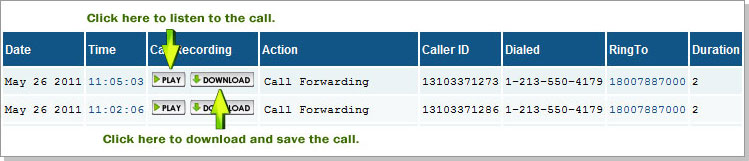
  • Click "Play" to listen to the call within the online control center; see fig.2.
  • Click "Download" to save a recorded call; see fig.2.

fig. 1


fig. 2
If you would like additional help activating call recording, please contact us.
More Information
I Understand
This website is using cookies.
We use cookies on our website to keep you logged into your account, track our traffic and personalize your experience. By continuing you accept cookies.